Lovable for Designers: The Complete Guide to Building Apps with AI (2026)
Every designer has prototyped something they believed in, then handed it to a developer and watched it become something else. Lovable is built for the moment you decide that handoff stops here.
Not a drag-and-drop page builder. Not a “design to code” converter that spits out spaghetti. A full AI app builder that takes your words and turns them into working, deployable software. The real question is whether it actually holds up for designers, or just sounds good in a demo. We mapped every feature, traced every recent launch, and filtered for what actually matters if you’re coming from a design background.
The short version: Lovable is not a design tool. It’s what comes after the design tool.
What Lovable Actually Is
Lovable is an AI-powered app builder. You describe what you want in plain language, and it generates a full-stack application: React + TypeScript on the frontend, Supabase-powered backend, database, authentication, the works. It started life as “GPT Engineer,” an open-source project that racked up 50,000+ GitHub stars. The commercial version launched as Lovable in November 2024, hit #1 on Product Hunt, and hasn’t slowed down since.
The numbers tell the story. Over 2.3 million users. $100M ARR. A $330M Series B in December 2025 at a $6.6B valuation, backed by Nvidia and Salesforce. This is not a side project. This is infrastructure.
For designers specifically, Lovable sits at an interesting intersection. It’s not trying to replace Figma. It’s trying to be what happens after Figma. The place where your designs become real, functional products you can deploy, test, and iterate on.

Visual Edits: The Figma-Like Layer
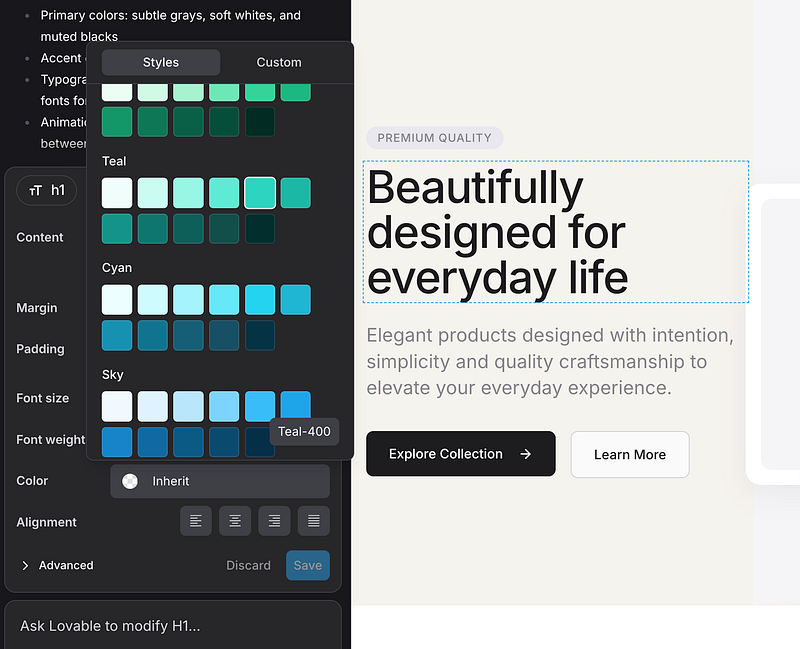
This is the feature that will feel most natural. Visual Edits lets you click on any element in your app and modify it directly: text, colors, spacing, padding, margins, borders, shadows, icons. No code required.
Think of it as a simplified version of Figma’s inspect panel, but instead of generating specs for a developer, your changes go straight into production code. Select multiple elements, edit text directly on the page, adjust properties through a visual panel. The second version (shipped August 2025) added a unified Design View with dedicated design tools that make the experience feel less like editing code and more like working in a design tool.
This is where designers will spend most of their time. Not in the chat prompt. Not in the code editor. In the visual layer, fine-tuning the details that make a product feel right.
Themes: Brand Control Without Touching Code
The Themes feature gives you centralized control over your app’s visual identity. Colors, typography, spacing, all managed from one panel with live preview. If you’ve ever built a design system in Figma, this will feel familiar. Define your brand tokens once, and they propagate across every component.
For freelancers building client projects, this is a time saver. Set up the brand, build the app, and every new page automatically inherits the right visual language.
AI Image Generation: Built-In, No Credits
Lovable includes image generation directly in the builder. Describe what you need, and it creates images on the spot. No switching to Midjourney. No credit costs. Since March 2026, it even supports transparent backgrounds, which makes it useful for icons, illustrations, and UI elements.
It won’t replace a dedicated image tool for hero visuals or complex compositions. But for placeholder content, quick illustrations, and functional imagery inside your app, it removes a step from the workflow.
Voice Mode: Build by Talking
This one sounds gimmicky until you try it. Voice Mode lets you describe changes and features by speaking instead of typing. For designers who think visually and verbally (most of us), this can feel more natural than writing detailed prompts.
“Make the header sticky, add a subtle shadow on scroll, and change the CTA button to our brand blue.” That kind of conversational instruction works surprisingly well. It’s especially useful during early exploration when you’re iterating fast and don’t want to stop and type out every change.
File-to-App: Turn Anything Into a Working Product
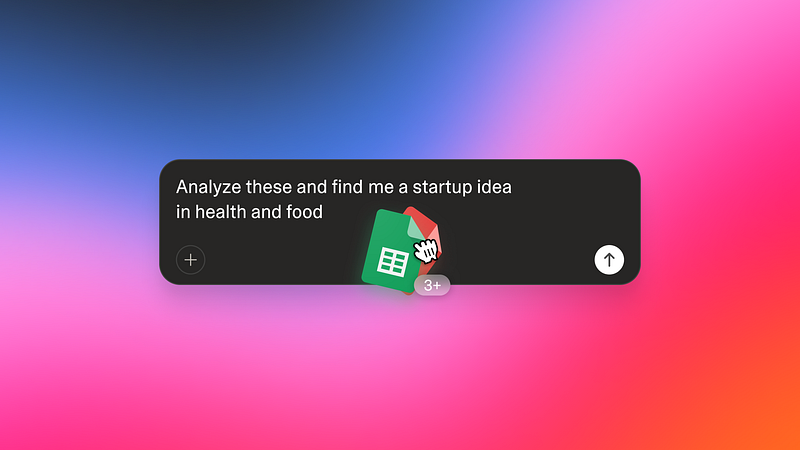
Upload a spreadsheet, a PDF, a presentation, or even a resume, and Lovable converts it into a functional web application. For designers, the most practical use case is rapid prototyping. Got a content doc from a client? Turn it into a working landing page in minutes instead of mocking it up first.
The Figma Connection (And What Happened to It)
Lovable launched Figma Import in January 2025, built in partnership with Builder.io. It let you import Figma designs and convert them into working code inside Lovable. For designers, this was the dream feature: design in Figma, build in Lovable, skip the handoff.
Here’s what you need to know: the Figma Import feature was removed in November 2025. The current workflow is prompt-first or visual-edit-first. You can still use Figma as your design tool and reference your designs while building in Lovable, but the direct import pipeline no longer exists.
This matters because it changes how you approach the tool. Lovable works best when you think of it as a building environment, not a design-to-code converter. Start with a prompt, shape it visually, refine in the visual editor. The mental model is closer to “designing in the browser” than “exporting from Figma.” If you want the Figma-to-code route, that workflow lives elsewhere, and we covered it in The Complete Vibe Coding Guide for Designers.
Agent Mode: The Real Game Changer
Since July 2025, Lovable runs in Agent Mode by default. This is not just a chatbot that writes code. It’s an autonomous system that can research your existing codebase, search the web for solutions, debug errors on its own, generate images, and validate its own changes before presenting them to you.
The practical impact: you can describe a complex feature (“add a user dashboard with analytics charts, a settings page with profile editing, and email notifications”) and the agent will break it down, build each piece, test it, and fix issues without you babysitting every step. Lovable reports 91% fewer errors since Agent Mode launched.
For designers, this means you can think in features and flows rather than individual components. Describe the experience you want, and let the agent figure out the implementation details.
Lovable Cloud: No More Backend Setup
Before October 2025, using Lovable for anything beyond a static page meant connecting to Supabase manually. Lovable Cloud changed that. Database, authentication, file storage, all built in. No external accounts. No configuration. No environment variables.
This is a big deal for designers who want to build real products. Need user login? It’s there. Need to store data? Already set up. Need file uploads? Built in. The entire backend layer that used to require a developer (or hours of YouTube tutorials) is now handled automatically.
Lovable Cloud is built on Supabase’s open-source technology, so the quality is solid. And if you ever outgrow Lovable or want a developer to take over, the code exports cleanly to GitHub.
Lovable’s Biggest Updates in 2026
The first quarter of 2026 brought several updates worth knowing about.
- Plan Mode (February 2026): Before the AI writes any code, it shows you a detailed plan of what it intends to build. You review, adjust, approve. This gives designers the kind of control they’re used to from design reviews, but applied to code generation.
- Prompt Queue: Stack up to 50 prompts and let Lovable execute them in sequence. Useful for batch changes across multiple pages.
- Browser Testing: A virtual browser environment where Lovable tests your app automatically, catching visual bugs and interaction issues.
- Cross-project referencing: Use @ mentions to reference other projects. If you’ve built a component library in one project, reference it from another.
- Shared Connectors: Slack, Twilio, Linear, Telegram, and Contentful integrations that let your app connect to external services through conversation.
- Workspace Knowledge: Define rules and preferences that apply across all your projects. Set your standards once, and every new project follows them.
The Big Announcement: Lovable Goes Beyond App Building
On March 19, 2026, Lovable announced its expansion beyond app building. The platform now handles general-purpose tasks: data analysis, business intelligence, presentation decks, marketing workflows. In their words, Lovable is becoming “a general-purpose co-founder that can do anything.”
What does this mean for designers? Two things.
First, your Lovable workspace is no longer just where you build apps. It’s where you can analyze user research data, generate pitch decks for client presentations, or run marketing analysis for a product you’re launching. The tool is positioning itself as an all-in-one work partner, not just a code generator.
Second, and this is the more interesting angle: it signals where AI builders are heading. The same prompt-to-output model that works for generating React components also works for generating spreadsheets, reports, and strategy documents. Lovable is betting that the interface (chat + visual editing + agent autonomy) is the product, not the output type.
For designers who freelance or run studios, this could consolidate several tools into one. Build the client’s app, analyze their analytics, create the investor deck. All from the same environment. Whether Lovable actually delivers on this ambition remains to be seen, but the direction is clear.
How Lovable Compares to Bolt, v0, and Figma Make
Lovable is not the only AI builder. Here’s how it compares to the tools designers are most likely to encounter. (For a broader roundup, see our guide to the best AI design tools in 2026.)
- Lovable vs. Bolt.new: Bolt gives you more technical flexibility (multiple frameworks, direct code editing). Lovable gives you a more complete out-of-the-box experience with Cloud, visual editing, and agent mode. Designers will likely prefer Lovable. Developers might prefer Bolt.
- Lovable vs. v0 (Vercel): v0 generates excellent UI components and deploys fast, but it’s designed for developers who know React. Lovable is more accessible for non-coders.
- Lovable vs. Replit Agent: Replit offers a full development environment with mobile app support (React Native). If you need native mobile, Replit wins. For web apps with a designer-friendly workflow, Lovable has the edge.
- Lovable vs. Figma Make: Figma Make stays inside Figma and converts designs to code. Lovable is its own environment. They solve different parts of the workflow and can actually complement each other.
What Lovable Gets Wrong
No tool review is honest without the friction points.
- Web only. No native iOS or Android apps. If you need mobile, you’re building a responsive web app or looking elsewhere.
- Error loops. Users report cases where the AI gets stuck in fix-break-fix cycles. Agent Mode reduced this significantly, but it still happens with complex logic.
- Prompt skill matters. Vague prompts produce vague results. Designers who think in systems (define the structure, then the details) get better output than those who describe everything at once.
- Complex logic struggles. Multi-step business logic, conditional workflows, and data transformations can confuse the AI. Simple apps work great. Complex SaaS features need more hand-holding.
- No Figma import anymore. If your workflow depends on designing in Figma first, the removal of direct import means extra steps.
The Designer’s Playbook for Lovable
If you’re a designer approaching Lovable for the first time, here’s the workflow that actually works.
- Start with structure, not visuals. Describe the pages, the user flow, the data model. Let the agent build the skeleton.
- Use Visual Edits for refinement. Once the structure exists, switch to the visual editor for spacing, colors, typography, and layout adjustments.
- Set up Themes early. Define your brand tokens before building multiple pages. It saves massive time later.
- Think in features, not screens. Instead of “build me a dashboard page,” say “build me a dashboard with user activity charts, a notification feed, and quick-action cards for the three most common tasks.”
- Use Plan Mode. Review what the AI intends to build before it builds it. This is your design review moment.
Lovable is not replacing your design process. It’s extending it. The designers who will get the most out of this tool are the ones who already think in systems, understand user flows, and can articulate what they want clearly. That’s most of us. We’ve been doing it in Figma for years. Now we can do it in production.
The line between designing a product and building a product is getting thinner every month. Lovable is one of the clearest examples of where that line is heading.
Want to stay on top of the tools reshaping design? Muzli delivers daily design inspiration and the latest industry updates, right in your browser.
Looking for more daily inspiration? Download Muzli extension, your go-to source for everything design.
Related articles

Figma Just Opened the Canvas to AI Agents – Here’s What It Means for Designers

Google Just Introduced “Vibe Design” with Stitch. Here’s What It Means for UI Designers

Weekly Designers Update #543

15 AI Design Tools That Actually Change How You Work in 2026

From Design to Code Without Losing Context: An MCP-First Workflow

The Complete Vibe Coding Guide for Designers (2026)

How to Build a 2026 Design Portfolio: Why You Need More Than Just Pixels
More categories
Looking for more daily inspiration? Download Muzli extension your go-to source for design inspiration!
Get Muzli for Safari


