Getting Started with Claude Design: A Collaborator for Your Design Workflow
Claude Design, Anthropic’s new conversational design tool, removes the friction between thinking and making. Instead of bouncing between chat and canvas, explaining what you want in Slack and executing in Figma, you work in one place: describe your idea to Claude, watch it generate on the canvas, refine through conversation, and ship directly to code.
Try claude design
For designers tired of tool-switching and developers wishing they could express design intent without writing code, this changes how design happens. The real power: you can take your design conversation and turn it into working HTML or Claude Code. No handoff limbo. No “I built this in Figma, now someone needs to rebuild it in React.”
What Is Claude Design?
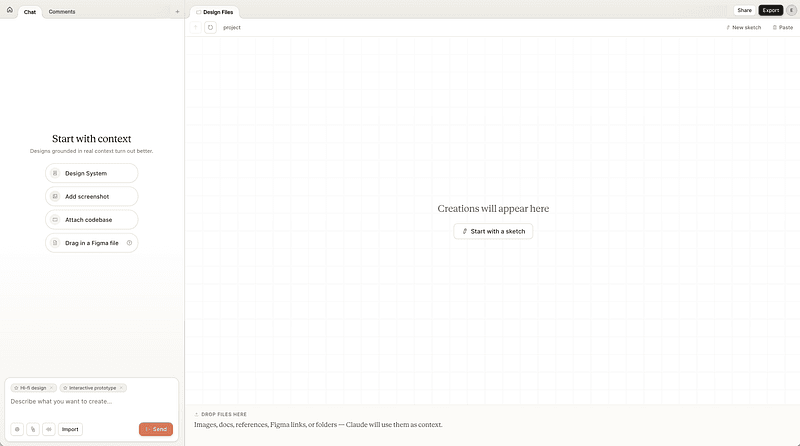
Claude Design is a research preview tool built by Anthropic Labs. It sits between ChatGPT’s pure conversation and Figma’s interface-first design. The dual interface works like this: chat window on the left, live canvas on the right. You describe a design problem. Claude generates working designs. You refine them through conversation (broad changes via chat) or precision editing (inline comments on components). The design updates in real-time as you talk.
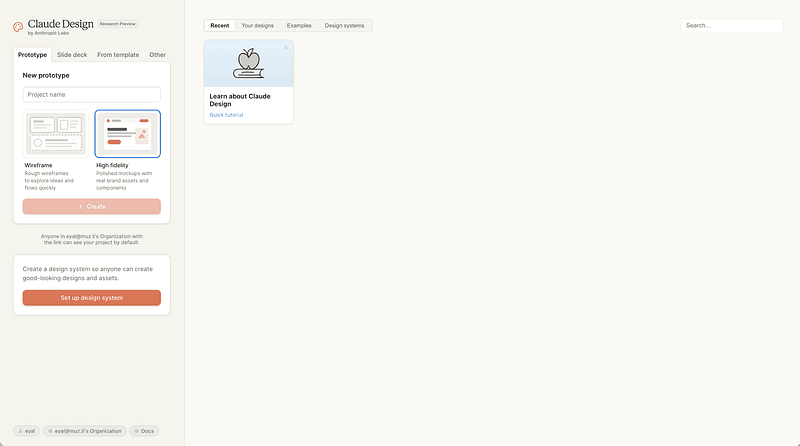
The core idea is radical in its simplicity: design isn’t about learning tool shortcuts. It’s about articulating what you want and collaborating with intelligence that can execute.
Who is it for? Designers who spend more time context-switching than creating. Product managers who can’t quite explain their vision in Figma. Developers who want to design but don’t have a design background. Teams where design happens across too many tools.
What problem does it solve? The gap between intent and execution. Right now, you have to choose between tools. Use Figma to collaborate with designers, but communicate intent in Slack. Use Miro for brainstorming, but export to Figma to polish. Use Claude to iterate on copy, but nobody’s working on the canvas. Claude Design closes that gap. Your entire conversation becomes your design.
Key Features That Matter
Dual Interface: Chat Plus Canvas
The interface is clean. Left side is conversation. Right side is your design. You type a request. Claude generates components, layouts, or full screens. You ask questions. It adjusts. You comment on specific elements. It refines. There’s no “export design to code” step because the canvas is always renderable: PDF, PPTX, HTML, ZIP, Canva, or Claude Code.
Design System Integration
Here’s what makes this genuinely powerful: Claude Design reads your codebase. During setup, point it to your design files or repository. Claude analyzes your actual colors, typography, component patterns, and spacing rules. Not approximations. Your actual design system. Then it applies that to every design it generates.
This isn’t you uploading a Figma file and hoping it sticks. It’s Claude understanding your design language at the code level. Every design it creates respects your brand automatically. Consistency without manual enforcement.
If you’re designing for a client or building something standalone, you don’t need a pre-built system. One message sets it: “Use a blue and gray palette. Typography is Inter. Components include buttons, cards, and modals.” Claude holds it through the entire conversation.
The difference: Figma forces you to build the system first, then design within it. Claude Design reads your system as context and designs from day one.
Iterative Workflow
Three ways to refine:
Chat-based iteration: “Make this form more compact.” “Change the hero section to a two-column layout.” “Add a sidebar navigation.” Claude rewrites the canvas without you leaving the conversation.
Inline comments: Click on a component, leave a comment. Claude sees it and responds. Precision beats bulk-editing for detail work.
Version management: Explore alternatives without losing work. Say “show me three variations of this dashboard.” Claude keeps each version accessible. Choose which to build on, or mix pieces from different versions.
Collaboration Built In
Unlike the isolation of a designer working alone in Figma, Claude Design treats collaboration as a core feature. Share designs with your organization. Set granular permissions: keep designs private, share view-only access for feedback, or grant edit access so multiple people can iterate with Claude in the same project.
This changes how teams work. Instead of “designer finishes, then shares to Figma, then engineers review,” everyone’s in the conversation. A product manager can jump in, leave a comment. An engineer can see the design and the rationale behind it simultaneously. The feedback loop collapses from days to minutes.
Export Flexibility
Once your design is done, you’re not locked in. Export as PDF for stakeholder presentations. PPTX for Powerpoint decks. HTML for usable prototypes. ZIP for files you can code from. Canva if you need quick social assets. Claude Code if the design is a starting point for building.
How to Get Started
Watch the official launch demo:
Claude Design Official Launch Video — Watch the full walkthrough
In 7 minutes, Anthropic walks through the entire workflow: describing an idea, Claude generating the design, iterating through conversation, and exporting to code. Watch this first if you want to see what you’re actually getting into.
Or dive straight into the official documentation.
Step 1: Access and Activation
Claude Design is available as a research preview on Pro, Max, Team, and Enterprise plans (Enterprise has it off by default, but your admin can enable it). Log into Claude.ai, and look for “Claude Design” in the apps menu. Click to create a new design project.
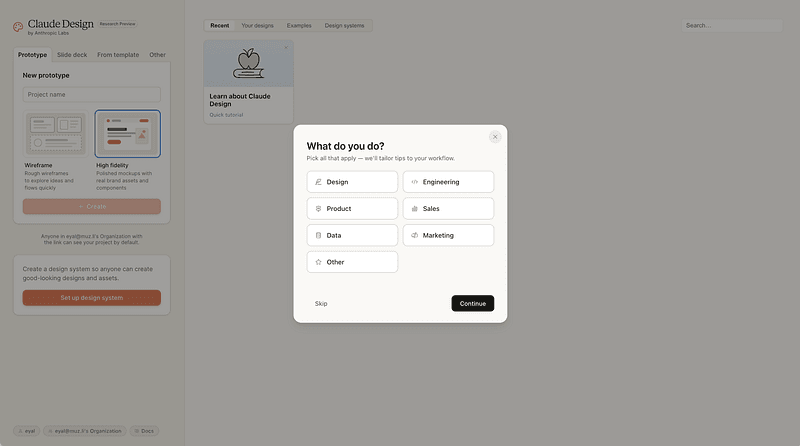
The onboarding asks one question: “What do you do?” Pick your role (Design, Engineering, Product, Sales, Data, Marketing, Other). Claude uses this to shape how it works with you.
Step 2: Define Your Context
Start with intent, not tooling. Your first message should answer: What are we building? Who uses it? What problem does it solve?
You can provide context multiple ways:
- Type a description: “I’m designing an onboarding form for a SaaS product. Users are busy product managers. The form should ask for company name, role, and team size. It needs to feel fast and not overwhelming. Use a clean, minimal aesthetic.”
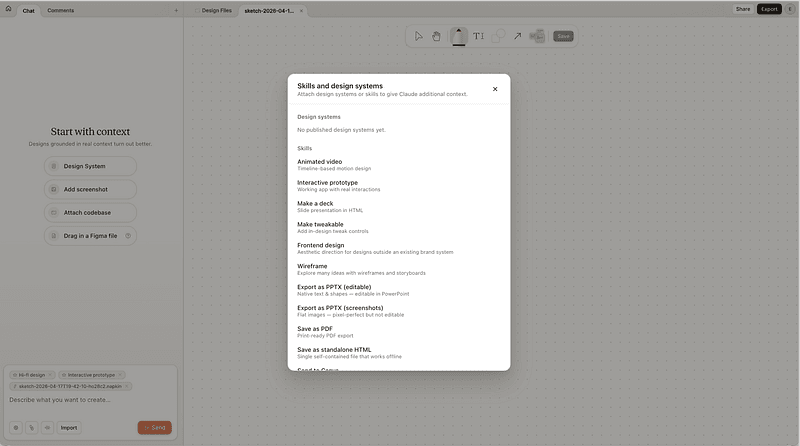
- Upload reference files: DOCX, PPTX, XLSX, images, screenshots of your current product
- Point Claude to your codebase: Claude reads your actual design tokens and components
- Use the web capture tool: Grab elements directly from your existing website. Claude uses those as reference and builds prototypes that look like your actual product
- Add a design system: Let Claude manage consistency automatically
Claude uses this context to make decisions about hierarchy, spacing, interaction patterns. You’re not describing buttons and boxes. You’re describing intent. Claude translates that to design. And it stays true to what already exists.
Step 3: Iterate Through Conversation
Claude generates a starting design. Now the work happens through natural conversation.
“The company input should be a dropdown of pre-filled options.”
“Make the progress indicator more obvious.”
“Can we move the ‘Learn more’ link to the footer?”
“Show me what this looks like on mobile.”
Each message updates the canvas. You’re having a design critique with someone who executes instantly. No Figma jumping. No waiting for a designer to implement your feedback.
Step 4: Use Inline Feedback for Details
For specific adjustments, click a component and leave a comment. “This button text should be white, not gray.” “Add 8px padding here.” Claude reads the comment and adjusts only what you flagged.
Step 5: Export and Ship (This Is the Game Changer)
This is where Claude Design becomes a development tool, not just a design tool.
Once done, choose your path. Sharing a concept with stakeholders? Export PDF or PPTX and they see exactly what you imagined. Needing social quick-assets? Canva export. But here’s the key: when you hand off to engineers, you’re not handing off a static Figma file asking them to “rebuild this in React.”
Export as HTML and they have a working prototype. Export as Claude Code and they have production-ready component scaffolding. The design becomes the starting point for development, not a specification to interpret. Engineers are writing features on top of your design, not rebuilding it from scratch. Fewer misunderstandings. Fewer “can you tweak the padding” rounds. Faster to ship.
This is the shift. Design isn’t the end of thinking. It’s the beginning of building.
![Export options menu OR Send to Claude Code modal]](/_vercel/image?url=https%3A%2F%2Fcdn-images-1.medium.com%2Fmax%2F800%2F1*dpOdMQbq2gLmCJ3zHk_-3Q.png&w=800&q=80)
When Claude Design Shines
Rapid Prototyping
You have an idea. You need to see it in 10 minutes. Traditional flow: sketch in Figma (or pen and paper), refine, add polish. Claude Design flow: describe the idea, refine through conversation, export. The feedback loop is instant.
Cross-Functional Collaboration
Designer and product manager working together. Designer says “Here’s what I’m thinking.” They paste the Figma link. Silence. Nobody engages with the Figma file. Switch to Claude Design. Product manager sits next to designer. They iterate together in real-time through chat. Designer makes decisions faster because feedback isn’t async.
Design-to-Development Handoff (The Most Powerful Use Case)
This is where Claude Design shines hardest. Forget 40-page Figma files with pixel-perfect annotations that engineers then rebuild from scratch in code.
Export as HTML and the engineer has a working prototype. Export as Claude Code and they have component scaffolding that’s already in their language. The design is no longer a specification. It’s a starting point. They’re not asking “did you mean this padding?” They’re asking “should we add validation here?” They’re building features, not rebuilding designs.
The handoff isn’t a translation task anymore. It’s a collaboration continuation. Designers hand off working artifacts that engineers build on top of, not redesign from.
Personal Projects and Experiments
You’re exploring a side project. You don’t need a full design system yet. Tell Claude what you’re building. It generates a cohesive design. You tweak it. You export. You build. No process overhead.
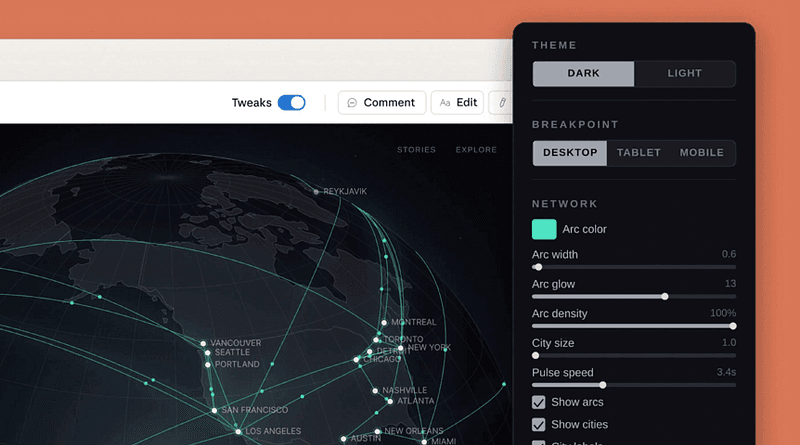
What takes weeks in Figma can happen in hours. Complex interactive visualizations. Data dashboards. Network maps. Anything visual, any complexity level. Claude handles the execution.
When You’re Not Sure What You Want
Ideation mode. You know the problem but not the solution. “I’m building a financial dashboard. Show me what that could look like.” Claude generates an option. You hate the layout but love the color scheme. “Keep the colors but try a sidebar navigation instead of top nav.” It adapts. You discover what you actually want through conversation.
What It Means for Designers
Claude Design doesn’t eliminate designers. It changes what design means.
Right now, design is expensive because it requires deep expertise in specific tools. You need Figma fluency to move fast. You need to know grid systems, shadow values, and spacing scales. You need to anticipate how design systems work. Those skills matter. They’re not going away.
But they shift from “how do I use this tool” to “do I know what good design looks like?”
Claude Design is part of a larger movement called vibe design. Vibe design is the practice of expressing design intent in natural language, letting AI handle execution. Instead of learning Figma shortcuts, you learn to articulate what you want. Instead of moving pixels, you move conversations. This isn’t less work. It’s different work, and it’s more interesting.
Claude Design hands off the execution. You handle the judgment. You decide what feels fast versus slow. You know when a form is intimidating and when it’s inviting. You recognize when spacing feels wrong. You catch inconsistencies. You direct the intelligence toward solutions that matter.
This is a small difference that compounds. Designers spend less time in menus and more time thinking. More time debating what a user actually needs. More time exploring alternatives because iteration is free. More time mentoring, because the tool gets the tedious parts.
For product teams without dedicated designers, Claude Design is the difference between “we can’t afford design” and “we can explore design ideas in the time we’d spend writing an email.”
For engineers, Claude Design bridges the design-to-code gap. You get HTML or component code that’s already been iterated on and approved. You’re not rebuilding a Figma mockup. You’re extending it. You’re implementing features, not reinterpreting specifications.
For design leaders, it changes hiring. You still need taste, judgment, and principles. You need people who understand human psychology and business strategy. You don’t need everyone to be a Figma expert. That bar moves. And the design-to-code handoff becomes a conversation, not a translation.
In 2026, this shift is already underway. Claude Design is one more piece of that puzzle. Tools get smarter. Design gets faster. The work becomes more interesting, not less.
Claude Design vs. Figma: The Real Story
Here’s what everyone’s asking: Does Claude Design kill Figma?
Short answer: No. But it will force Figma to evolve, which is healthy.
The distinction matters. Figma is a collaborative design system and source of truth. It’s where teams align on components, spacing rules, and brand standards. It’s built for precision, review, and long-term maintenance. If you’re managing a design system for a mature product with 50+ screens, you’re not moving away from Figma.
Claude Design is for speed and intent. It’s built for: “I have an idea and need to see it in 10 minutes.” Or: “I’m a product manager and I can’t express this in Figma but I can describe it.” Or: “I’m shipping an MVP and I don’t have time for design iteration theatre.”
In practice, they coexist. Design team uses Claude Design for rapid ideation, then brings approved designs into Figma for the design system. Engineers use Claude Design to export HTML, but designers manage the source of truth in Figma. Product manager rapid-tests ideas in Claude Design, then hands off production work to the Figma file.
What Figma could do. Figma will likely build something similar (they acquired Diagram for AI capabilities, and they have Make for some of this). When they do, they’ll have an advantage: integration with their existing design system tools. Figma is bigger and slower to move. Claude Design is newer and built specifically for this workflow.
What matters for you. Don’t think “Figma or Claude Design.” Think: “Which tool is right for this problem right now?” For ideation and rapid prototyping, Claude Design is faster. For systems and collaboration, Figma wins. For design-to-code, Claude Design has the advantage today. That could change.
The real winner in this competition is you. More tools that understand design intent. More options for different problems. More pressure on vendors to make design less about tool expertise and more about thinking.
My Take: Why This Matters More Than You Think
I’ve been watching design tools evolve for a while. Figma was the disruption that made design collaborative. Claude Design is the next disruption: making design conversational.
Here’s what bothers me about the last 10 years of design culture: we made design unbearable for most designers.
Let’s be specific. The last decade sold us a story. We need design systems. We need token architecture. We need component libraries with perfect specs. We need design-to-development handoff precision. All of that became the work. For many designers, it became almost all of the work.
And I watch designers drowning in this. Spending days building complex components in Figma. Managing spacing tokens that change every quarter. Maintaining design systems that become outdated before they’re finished. Creating intricate layouts that take hours to build and hours more to keep consistent. Arguing about whether a padding value should be 12px or 16px while the actual design problem goes unsolved.
This isn’t a complaint about tools. It’s a complaint about what we decided design is.
Design used to be about solving user problems. About thinking creatively. About seeing a gap and filling it. About getting excited when you find the right solution. That’s the core of what we do.
But we buried it. We got so focused on structure, tokens, components, and specifications that the actual design thinking became secondary work. Designers became operators of design systems instead of solvers of problems. The busywork expanded to fill the entire day. The creative thinking got squeezed into the margins.
Many designers are exhausted. Not because design is hard. But because we made it tedious.
Claude Design changes this. Specifically. It removes the actual burden.
You don’t spend hours building complex components in Figma and then maintaining them. You describe the component. Claude builds it. You iterate on whether it solves the problem, not whether the padding is correct. You don’t spend a week architecting a token system. You describe your design language once. Claude applies it everywhere. Automatically. Consistently.
The tedious structural work that’s been eating your time? It’s gone. You don’t build intricate layouts manually. You describe them. You don’t argue about spacing values. You express intent. The tool figures out the specs.
What this actually means: For the first time, designers can skip the busywork and go straight to the thinking. What does the user actually need? What problem are we solving? What should this feel like? Those are the questions that should take your energy. Not “how do I organize this 40-component library” or “is this token value consistent across 12 files.”
This is actually radical. It means you don’t have to be a Figma power user. You need to be able to think. To articulate what you want. To recognize when something feels wrong. To solve actual user problems. That’s it.
That scares some designers. It should. Because designers who’ve spent the last decade becoming expert Figma operators but never learned to think about design problems are about to learn that tool expertise was never the valuable part.
But if you’re good at the actual work — solving problems, thinking creatively, understanding users — you’re about to get your job back.
For the first time in years, you won’t spend your day managing tokens and components. You’ll spend it thinking about solutions. Your energy goes to the work that actually matters. The problem-solving. The thinking. The creativity. The excitement that made you a designer in the first place.
I’m genuinely excited about this. Not because Claude Design is a perfect tool. It’s not. It’s early. It’ll have gaps. But because it’s permission to stop doing the busywork. Because it gives us back design as thinking, not design as token management.
In 2026, we’re finally moving toward a place where design can be about what it should have always been about. Solving problems. Creating experiences. Thinking carefully about what users need.
Not spending eight hours managing a component library.
Resources and Next Steps
Official Resources:
- Claude Design Official Launch Video — Full walkthrough of the workflow (7 min)
- Claude Design Official Announcement by Anthropic Labs — Includes roadmap notes on integrations coming in the coming weeks
- Getting Started Documentation
- Claude Design on X — Launch thread
What’s Coming:
Over the coming weeks, Anthropic is making it easier to build integrations with Claude Design, opening the door for custom tool connections and workflows. Watch the announcement page for updates.
Related Reading:
- What is Vibe Design? — Understand the broader design movement
- Vibe Designing Explained — Deep dive on vibe design principles
- An Engineer’s Guide to Vibe Design — Technical perspective
Curious about other tools changing how designers work? Check out Muzli’s guide to design tools and workflows to stay ahead of what’s next. We track launches, test new platforms, and share what matters for your practice. 🎨
#ClaudeDesign #AIDesign #DesignTools #ProductDesign #DesignWorkflow
Written by

Eyal Zuri
Co-Founder and Creative Director at Muzli · View profile on Muzli

Every new tab, full of fresh inspiration.
Join 800k+ creatives who start their day on Muzli.
Add Muzli — freeRelated articles

AI didn’t kill the design process. It made being dirt cheap. The new workflow, the tools, and what you should do today.

GPT-6.1 Sol built our 3 Opus 5.5 briefs for $1.88. Here are the live demos, the prompts and what else OpenAI’s DevDay gave designers.

Opus 5.5 builds Muzli Picks-level websites. Here are 3 live demos, the prompts and how to make your own.

Figma AI Design Agent: What It Actually Does Inside Your Files

Claude Design, One Week In: Hacks, Best Practices & Tips From Real-World Use

Vibe Design in 2026: What AI-Generated UI Means for Your Work

Figma Just Opened the Canvas to AI Agents – Here’s What It Means for Designers
More categories
Looking for more daily inspiration? Download Muzli extension your go-to source for design inspiration!
Get Muzli for your browser

