Build sites that don’t smell like AI, and host them on Muzli for free
TL;DR
- 🧠 AI tools design from averages. Ask for a landing page and you get the one they have made a thousand times. Designers dodge that by looking at references first, and now your AI can too.
- 🔌 Muzli MCP connects your AI to the work designers look at every day. It works in Claude, ChatGPT, Cursor and VS Code, takes a minute to set up and is free with a Muzli account.
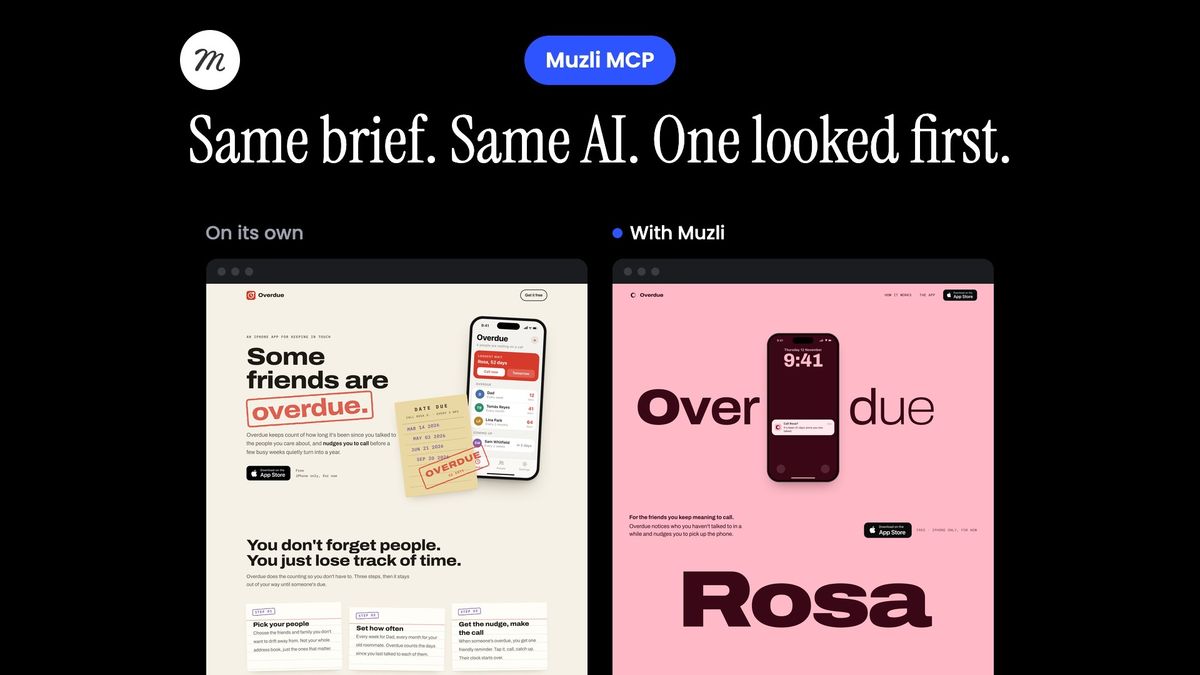
- ⚖️ Same brief, same model, one with Muzli. Without Muzli, Opus 5.5 built the same library-card page twice. With Muzli it built one that looks like a studio made it, moves like one, and can say where every idea came from.
- 💬 Six prompts do most of the work. Ask for three directions built on different references, make your AI name what it took from each, then build section by section.
- 🚀 “Publish this to Muzli” puts it online. Free hosting at your-project.muzli.space, a draft on your Muzli profile and new versions at the same address. A type poster toy went from a one-line idea to a live link in seven minutes.
You can build a website before lunch now. Describe it to Claude or ChatGPT, wait a few minutes, and there it is.
The catch is that it looks like everybody else’s: a centred headline, a soft purple gradient and three cards in a row. Or it’s the newer favourite, a warm off-white page with a serif headline and one terracotta button, which most of us can now spot from across the room.
Designers politely say it looks like a template, and everyone else just calls it AI-made.
I have been designing and building software for more than twenty years, and for the last twelve Muzli has shown designers the best new work every morning. So we did the obvious thing. Today your AI can look at that same work before it builds, and put what it made online for free when it’s done.
The rest covers how to connect it, a side-by-side test with live results, the prompts that matter, and the free hosting, which I suspect is the part you’ll use most.
Why every AI page looks the same
A language model learned design by reading a few billion web pages. When you ask it for “a modern landing page”, it gives you the middle of all of them.
It works like asking a thousand people to draw a house. You get a square with a triangle on top and a door in the middle. Nobody draws a bad house, and nobody draws one you would remember.
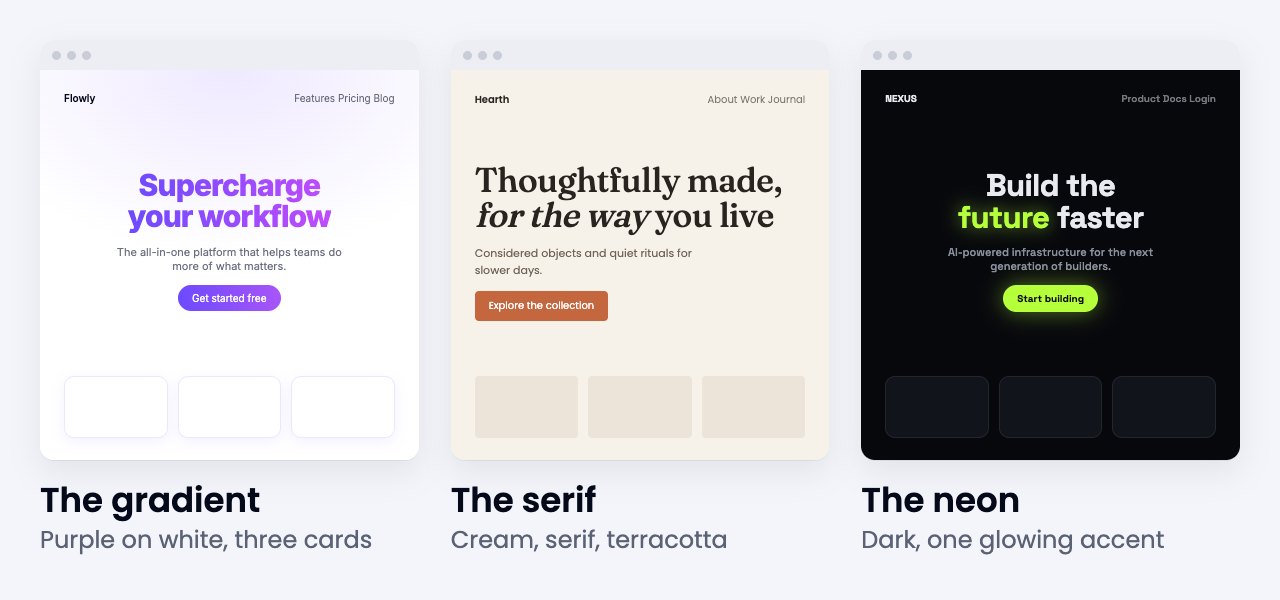
Designers fix this the boring way. Before they draw anything, they look. A good designer keeps a folder of screenshots, checks a few galleries every week and has strong opinions about what’s working right now. The references set the bar, and the craft is in choosing what to take from each one.
An AI tool skips the looking because it has nowhere to look. The Muzli MCP gives it somewhere.
What the Muzli MCP does
First, the jargon. MCP stands for Model Context Protocol, a standard plug that lets an AI tool use another service. Claude, ChatGPT, Cursor and VS Code all take it, so one connection works everywhere you build.
With Muzli plugged in, your AI can:
- 🔎 Find real websites of the kind you are making, shipped in the last two years and picked by galleries like Awwwards, SiteInspire and Land-book or by Muzli Picks.
- 🔥 See what designers are clicking on Muzli this week.
- 🧩 Break a page into sections and get references and palettes for each one.
- 🗂️ Open any of our 75 collections, from pricing tables to 404 pages.
- 🎨 Find work built around a colour, such as your brand’s.
- ⭐ Use the designs you saved on Muzli as its references.
The part I like most is the instructions it comes with. Muzli tells your AI to open the strongest references, pick two or three and say what it takes from each, starting with the thing each one is remembered for, which is often how it moves. It warns it about the three looks above and about the first picture a product’s name suggests, and if a design still lands on one of those looks, the AI has to say which reference led there. Layouts and pictures stay off limits, and when a reference comes from our community, the AI names the designer.
In practice your AI shows its homework. You see which sites it looked at and what it borrowed before it writes a line of code, so you can push back while changes are still cheap.
Free: one design a week, with everything · Pro: from $7.50 a month, every design, every day
Connect it in a minute
You need a free Muzli account and this address:
https://mcp.muz.li/mcp- 🟠 Claude. On claude.ai or in the app, open Customize, then Connectors, then + Add, then Add custom connector. Name it Muzli, paste the address and sign in. Free Claude accounts can add one custom connector.
- ⌨️ Claude Code. Run this in your project, then type /mcp and sign in.
claude mcp add --transport http muzli https://mcp.muz.li/mcp- 🖱️ Cursor and VS Code. Use the one-click buttons on muz.li/mcp.
- 💬 ChatGPT. Open Plugins, then +, then Add custom MCP server. Whether you can depends on your plan, so check OpenAI’s guide for yours.
The first time your AI uses Muzli, you sign in and choose what it may do: look up designs, or look up designs and publish sites. Take the second if you want the free hosting from the end of this article.
Same brief, same model, one with Muzli
Claims are cheap, so I tested it. Fresh Claude Opus 5.5 agents in Claude Code got the same request word for word and the same rules: build it, take screenshots, and fix what looks off at least twice. One of them had Muzli connected. None of them got a single note from me.
This is the request, written the way a person who doesn’t design would write it:
Build a one-page website for Overdue, my side
project. It's an iPhone app that notices which
friends you haven't talked to in a while and
nudges you to call them. Free, iOS only for now.
The page should explain it, show the app and link
to the App Store. Make it look like something that
would get featured on Awwwards or Muzli Picks, not
like an AI-made template.
I ran the plain agent twice: once with that request, and once without its last sentence, the way most people would type it. Each run took ten to fifteen minutes.
🤖 On its own, twice
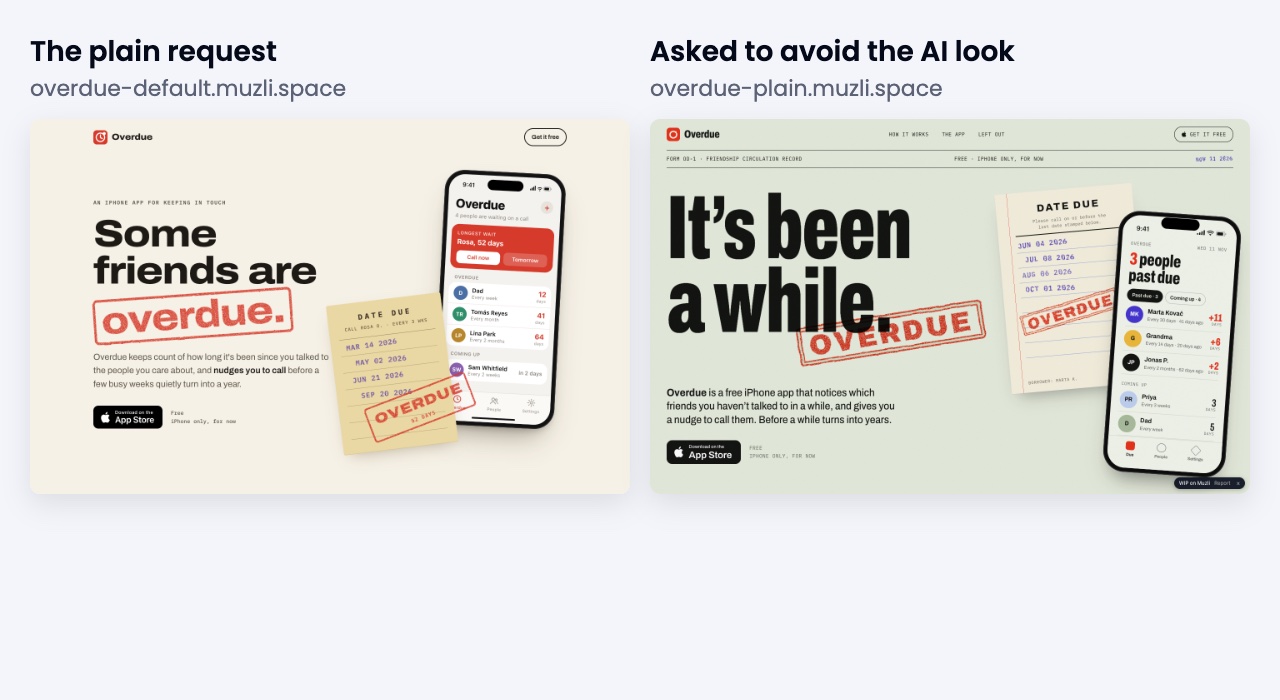
Credit where it’s due, Opus 5.5 is good, and both pages are tidy. Look closer and they are the same page. Overdue is a library word, so both runs designed a library “date due” slip, with red rubber stamps on paper and an iPhone list of friends next to it. Both take one theme from the product’s name and stamp it on everything.
The plain request even landed on a warm off-white page with one red accent, a serif away from the second look in the picture above. Asking the AI to avoid the AI look changed the paper from cream to sage.
The averages problem fits in one picture. The model has one idea for the word “overdue”, and it gives you that idea every time.
🧭 With Muzli
The Muzli agent started by asking Muzli for references for a mobile app landing page. It got back eight shipped app sites from the website galleries, opened the live sites of the ones it liked, read how they move, and built on three of them.
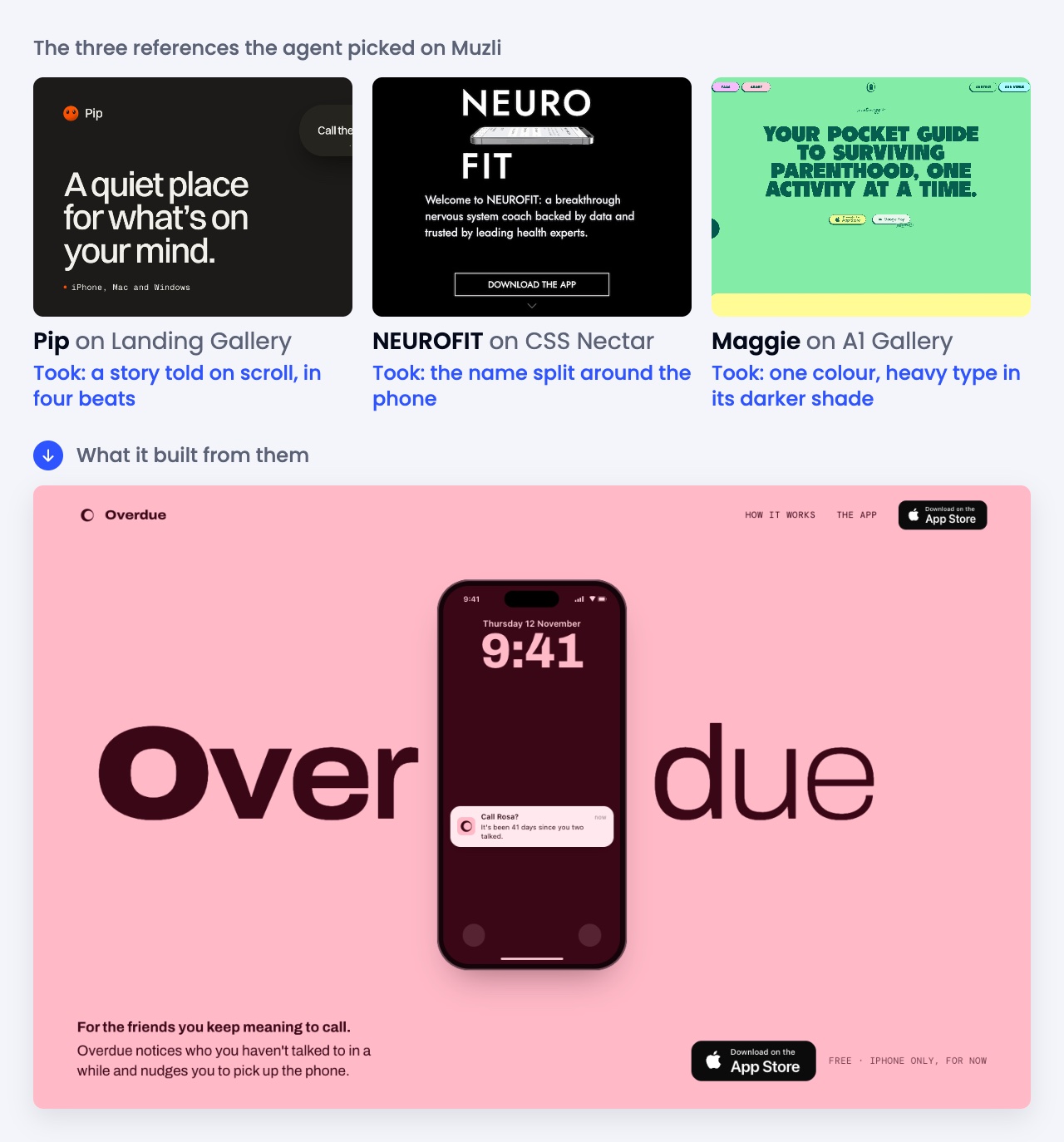
Pip, a calm notes app, tells its story on a stage that stays put while you scroll through four numbered beats. The agent took that and made scrolling stand for time passing. NEUROFIT splits its name around the phone, so the hero here reads Over, then the phone, then due. Maggie sets huge heavy type in a darker shade of one bright colour. The agent kept the rule and picked its own colours: pink with deep wine, and the green of the iPhone’s answer button for the moment you call.
The idea it built on top of them is the part I didn’t see coming. The page follows one friend, Rosa. You talk, and her name sits on the page in heavy type. Life happens, the counter climbs to 41 days, and her name gets thinner and paler with every day while her row climbs the list on the phone. Overdue sends a nudge. You call, the page turns green and Rosa’s name snaps back to full weight. Even “due” in the hero is set lighter than “Over”, as if the word is fading too.
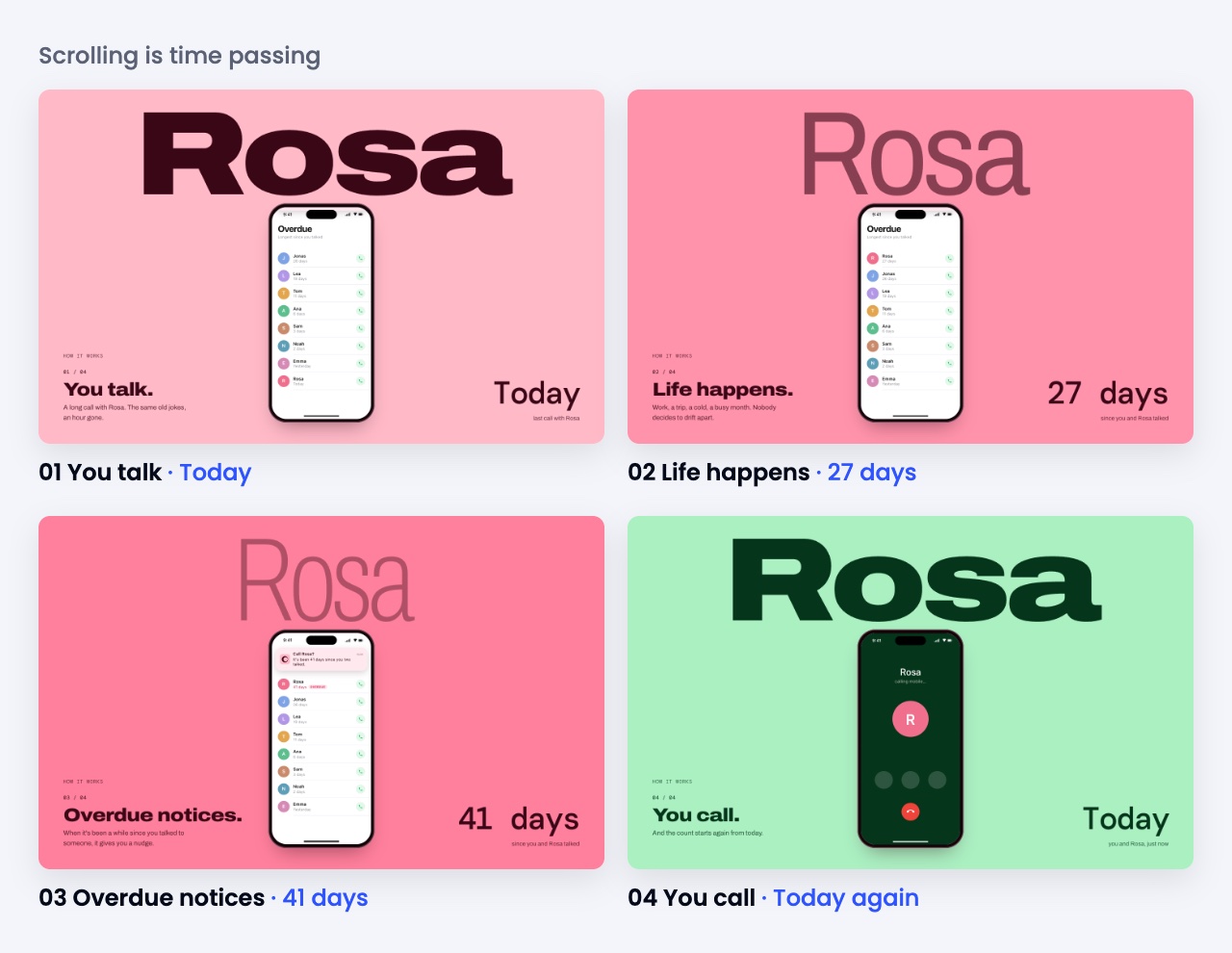
It took 29 minutes, about twice as long as the plain runs. It asked Muzli three times and went through five rounds of fixes.
And there’s no library card anywhere. Both plain runs drew the picture the name suggests, and so would almost any AI you ask. That’s one of the rules Muzli gives every agent. The first picture a product’s name brings up is the one every AI draws, so the page should start from a reference’s signature instead. Here that was Pip’s story told by scrolling, and the fading name is what the agent made of it for this product.
My read: the plain runs are tidy versions of one idea, and the Muzli one looks like a studio made it. It commits to one idea that belongs to this product, its palette and type have a source, and it moves like the sites designers actually click on.
One run each makes a demo, and a benchmark would need dozens. The request is above, so try it yourself, with and without Muzli, and judge.
Six prompts that do most of the work
Plain words work with Muzli. A few prompts still make the difference between “nicer” and “looks like a designer helped”, and they follow the way designers work with AI, which I wrote about in the new design workflow.
🧭 Look before you build
Before we start, look at the best landing pages
on Muzli for businesses like mine and tell me
what they have in common.
🎲 Make three, pick one. Each direction starts from a different reference, so the three really differ.
Give me three directions for my homepage, each
built on a different reference from Muzli. Name
the references and wait for me to pick one.
🧱 Build it section by section
Build the pricing section. Look at how the pages
in Muzli's pricing collection handle it first.
🎨 Start from your colour
My brand colour is #0f4c5c. Find designs on Muzli
built around it and make me a palette from them.
⭐ Use your own taste. Save the designs you like from the Muzli new tab as you browse, then:
Use the designs I saved on Muzli as the
references for this page.
⚖️ Check it against the best
Which of these two versions is closer to the best
recent work on Muzli? Show me the examples you
compared them with.
In Claude Code the same moves come as slash commands: /muzli:moodboard, /muzli:design_section, /muzli:palette_from_references and /muzli:weekly_digest. Type one in a chat about your project and it takes the subject from there.
One rule of thumb covers all of them. If your AI can’t name the reference behind a choice, it’s guessing, so ask it which one.
Put it online with one sentence
Most AI-built things die in a folder called final-v3, because putting them online means a hosting account, settings and usually a credit card.
With publishing switched on, you say this:
Publish this to Muzli and send me the link.Your AI checks the folder, puts it online at an address like your-project.muzli.space and adds a draft project to your Muzli profile, where you pick a cover, write a few words and submit it. Before anything goes live, Muzli checks the files for secrets, for anything loaded from unknown servers and for content that could mislead visitors.
Free · 10 sites online · 25 MB a site · new versions at the same address · visitor counts
After that it works like the rest of the chat:
- “Make the headline bigger and publish it again.” Same address, new version.
- “Bring back the previous version.” It rolls back.
- “How many people visited this week?” It tells you.
- “Take it offline.” Done.
In a chat without a terminal, such as claude.ai, your AI can publish one self-contained page of up to 150 KB.
🧪 From idea to link in 7 minutes
To time the whole thing, I gave a third agent a one-line idea and nothing else:
Make me a little toy: I type a word and it turns
into a moving type poster. A few styles to flip
through, and a button to save the poster as a PNG.
Then put it online with Muzli and send me the link.
Seven minutes later it sent me type-toy-kbnv.muzli.space. It looked up kinetic type on Muzli and built four styles on four references: Mat Voyce’s Type Scraps and his animation for PUMA, Xtian Miller’s optical tension posters and a NYC typography poster set. It credited all four on the page, checked one screenshot, fixed what was off and published.
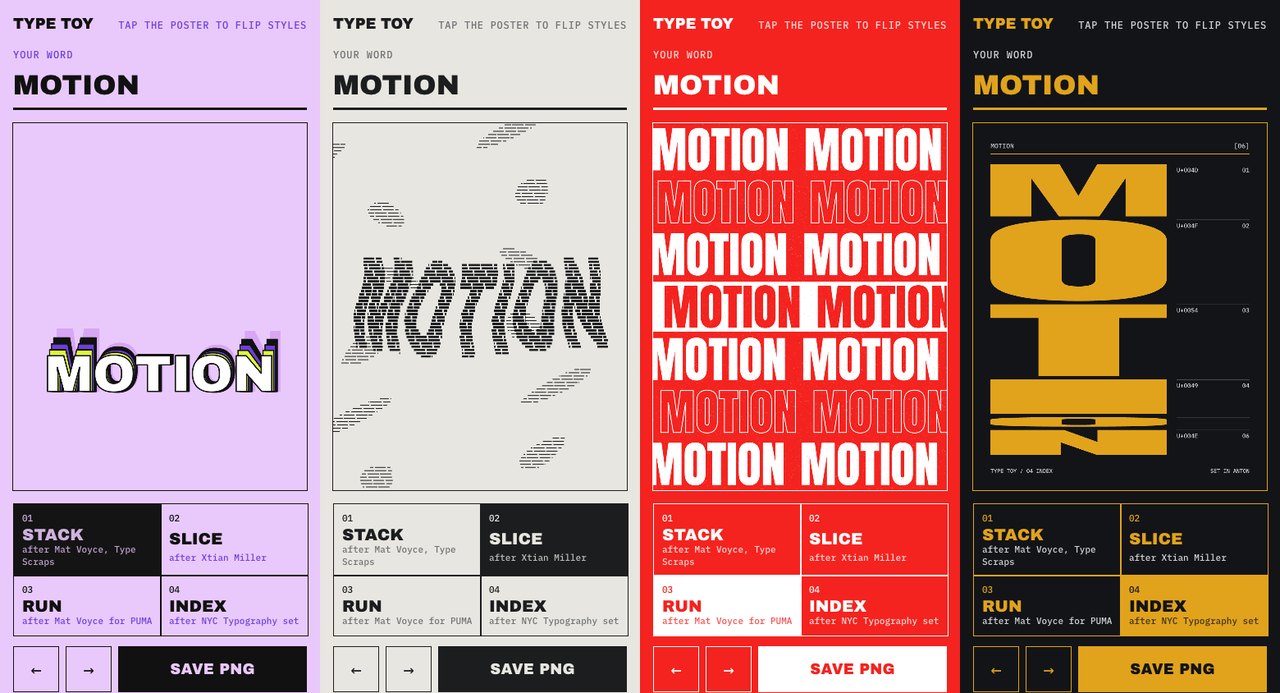
Go type your name into it. I’ll wait.
What it’s good for
- 💼 Client previews. Send a link during the call, change it at the same address and roll back when the client decides they liked Tuesday’s version better.
- 🧪 Experiments and toys. The thing you built on a Sunday afternoon deserves a link you can post.
- 🎤 One-off pages. A launch, a talk, a workshop, the schedule for a friend’s wedding.
- 🗂️ Portfolio pieces. Every site arrives on your Muzli profile, so the work and its story live in one place.
- 🧑🔬 Prototypes for testing. Send it to five people and check the visitor count before you ask them what they thought.
The house rules
Every site is static and self-contained: your files, plus scripts, styles and fonts from the usual public CDNs. Pages can’t call other servers and forms can’t send anywhere, which makes a fake login page pointless and means nothing breaks when somebody else’s server moves. Sites stay out of search engines, carry a small “Published via Muzli” tag that visitors can close, and you can keep ten online at a time.
Think of muzli.space as a place to show work. A shop with a checkout still needs a real host.
Your homework: one page, one link
AI made building cheap, which leaves how it looks and how it feels as the part worth competing on. Your AI won’t invent taste on its own. Show it where to look, though, and it borrows from the right places and tells you what it borrowed.
The one thing to watch is the first thing your AI says after you ask for a page. If it names references and what it takes from each, you’re in good hands. If it starts writing code, stop it and ask it to look first.
So pick the page you keep putting off: the portfolio, the side project, the pitch for that client. Connect Muzli at muz.li/mcp, ask for three directions, pick one, publish it, and send the link to the person whose opinion scares you most.
Your AI has seen every website. Now it can see the good ones.
Setup: muz.li/mcp, Claude custom connectors, OpenAI. Demos: built by Claude Opus 5.5 agents on November 11, 2026, published as they made them.
Written by

Petras Baukys
Co-Founder and CTO at Muzli · View profile on Muzli

Every new tab, full of fresh inspiration.
Join 800k+ creatives who start their day on Muzli.
Add Muzli — freeRelated articles

Are we out of new things? No. We’re all copying the same homework.

AI didn’t kill the design process. It made being dirt cheap. The new workflow, the tools, and what you should do today.

GPT-6.1 Sol built our 3 Opus 5.5 briefs for $1.88. Here are the live demos, the prompts and what else OpenAI’s DevDay gave designers.

Opus 5.5 builds Muzli Picks-level websites. Here are 3 live demos, the prompts and how to make your own.

Figma AI Design Agent: What It Actually Does Inside Your Files

Claude Design, One Week In: Hacks, Best Practices & Tips From Real-World Use

Getting Started with Claude Design: A Collaborator for Your Design Workflow
More categories
Looking for more daily inspiration? Download Muzli extension your go-to source for design inspiration!
Get Muzli for your browser